Blog posts

I have an issue with the Posts-element. :(
We have followed the instructions in another post here to set up a posts page and then a Template under Brizy, using the Posts-element (3 columns and 1 row).
The only issue is that the posts image is not shown (only a grey rectangle is displayed) and if I try to change the image on one post (in the Posts-element) it will show that image on all 3 posts. :-O
Any idea what I'm doing wrong? :-)
-

Hi Noralf,
If you have added Featured Images, it should show automatically in the Posts element. Have you added Featured Images to your blog posts?
If you are developing a blog page and want to list all your blog posts, you should use the Archive element instead of the Posts element.
0 -
Hi,
I've just watched an interesting video: Blogging & Dynamic Templates in Brizy Website Builder | WORDPRESS | PRO - YouTube :)I'll try the things suggested there (which are similar to your suggestion), probably that will sort out my challenge.
Thanks a lot!
0 -
But... In the newest version of Brizy it seems like most of the Wordpress-stuff is missing under "Add Elements" :-O Are we supposed to use the #<element>? And how can I add the featured image as post image on the top of the post (I want to have a dynamic image, not static like in the video)? :-)
0 -
Hi Noralf,
When you are editing a regular page, you will see the blog related elements towards the bottom of the elements panel under the heading 'Single'
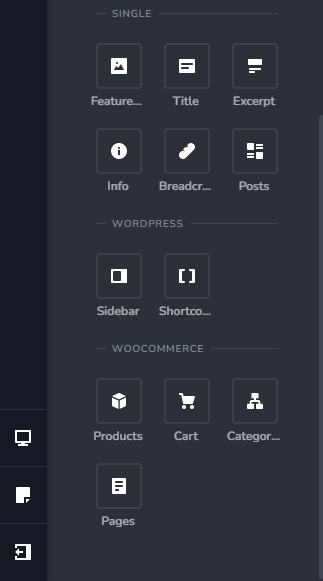
When you are creating a Brizy blog post template, you will see the blogging elements towards the top of the elements panel.
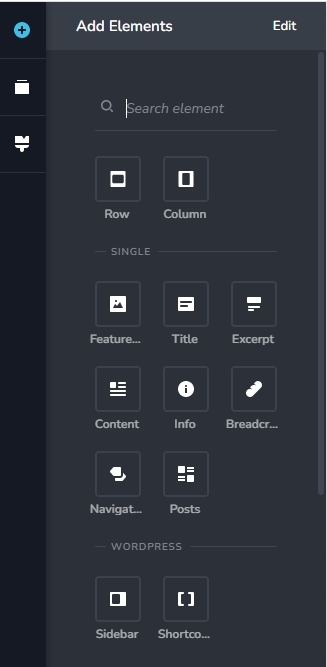 0
0 -
Good morning!
Actually I've almost got it to work the way I wanted, thanks to your help and the video. :-)
At least it's good enough (not to mention: dynamically enough :) )
Thanks a lot!
0
Please sign in to leave a comment.
Comments
5 comments