Change Infor bar popup width

Dear support:
I'm using popup feature, but I do not want to have full width popup at the bottom. It will cover the livechat widget I have.
Can you please let me know how do I change the width setting?
Here is a video: https://share.getcloudapp.com/nOu1EoD2
Thanks!
-

Hi Anson,
You can set the popup width with by clicking on the black dot on the top right and selecting the Cog icon. Please see this video. https://jmp.sh/XjOhrr6Q
0 -
Great, thanks, can I set this popup automatically stop display at the end of the count down day? so I don't have to manually remove it.
0 -
Hi Anson,
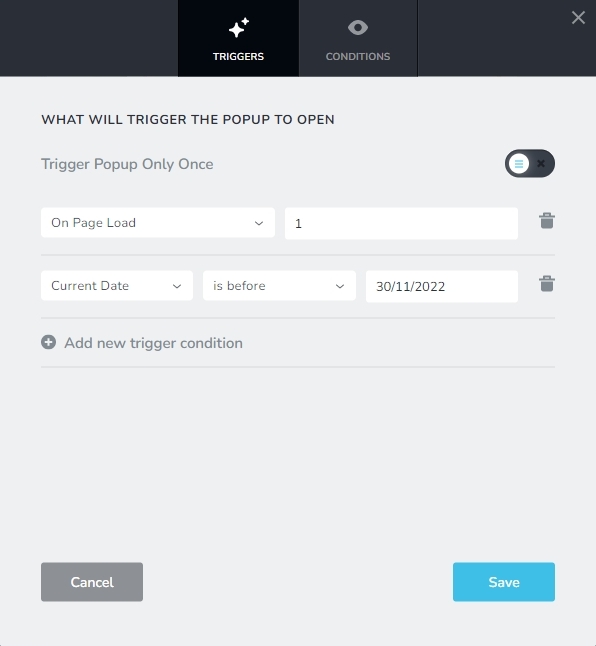
You could try adding the Display Condition Current Date is before 30/11/2022. When there are more than one condition, Brizy seems to show the popup when either condition is met and not when both are met. Hence I am not sure if this would serve your purpose.
 0
0 -

Dear support:
I'm also using popup feature and I have read your replies(above) and your uploaded videos(above).
Can you please let me know how do I:
i. change the width setting of the popup to below 200pix?
ii. change the background of the popup to be transparent(it seems to force white on me)?I wanted to upload my screenshot attached here.
But all file types and sizes (200KB, 300KB or 50KB are still rejected)
My site is:
https://jaguar0e00c954.brizy.site/Thanks!
0 -
Hello Barry,
Let me go over your questions.
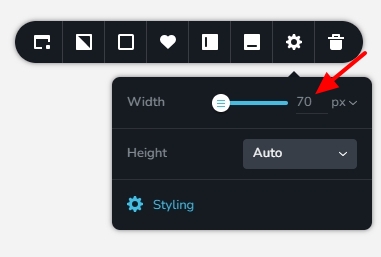
- The popup width can be set to below 200 pixels by typing its value here.
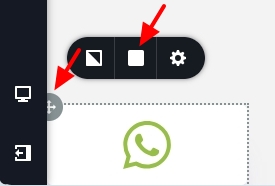
- Click on the top left corner of the "Row" element around the WhatsApp icon. Then select the Color icon and reduce the Opacity to 0% to make the popup transparent.
0 - The popup width can be set to below 200 pixels by typing its value here.
Please sign in to leave a comment.
Comments
5 comments