Forms not working for Email or API in Brizy Cloud

Hi there. Please know that I REALLY tried to find a resolution to this prior to my outreach. Nothing is working. I am trying to set up a form in Brizy Cloud. I have the required fields for name and email. I tried to do the Email Notification under the "plug" icon where the submit button is but it didn't work. I then tried to add two emails, one personal, one business and that didn't work either.
So I tried to add another contact form thinking maybe something was wrong with the form I was using but that didn't work either.
So next I tried to add my SendInBlue email account. I followed your instructions and connected the API...selected the appropriate list...etc...and it connected. But when I went to try that out, that didn't work either.
So now I'm stuck with neither option working for me and a message that keps saying...
"Your Email Was Not Sent". I also tried to just redirect, but that didn't work either. What am I doing wrong?
PLEASE help me fix this ASAP.
Thank you kindly in advance.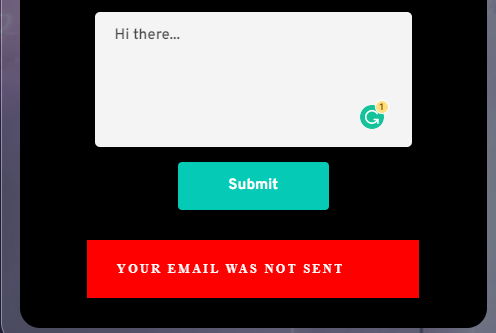
-

Hi Lamont,
We would like to check this issue from your project. Can you please mention the public URL of your project where you are facing this issue?
0 -
Hi KC. Yes, the page is - https://apricot8323057.brizy.site/contact-me
Let me know if anything else is needed.
0 -
Hi Lamont,
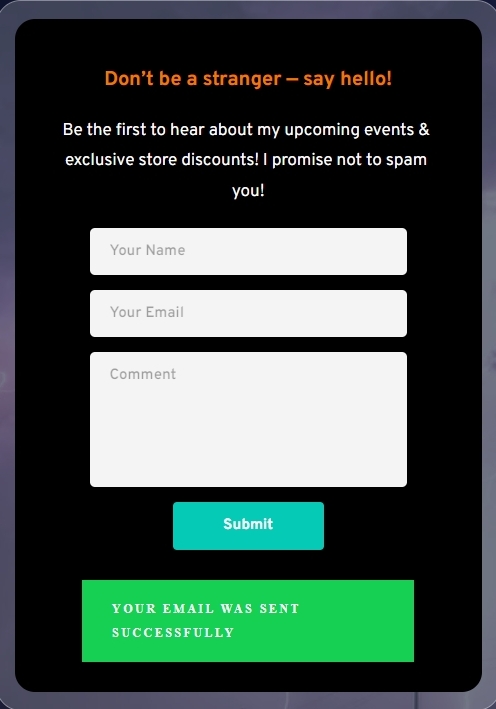
I tested your form at https://apricot8323057.brizy.site/contact-me I received a confirmation that "Your email was sent successfully"
Do you still have this issue or is it resolved?
 0
0 -
I just tried it out and am still having the issue on my end. This is in Chrome and the cache is cleared also. So then I just tried it in Firefox (where I'm not logged in to Brizy at) also and got the same error.
I checked my SendInBlue account and do see your "KC" email though.
If it's working on your end, and not mine, what could the issue be? What shall we try next?
0 -
Hi Lamont,
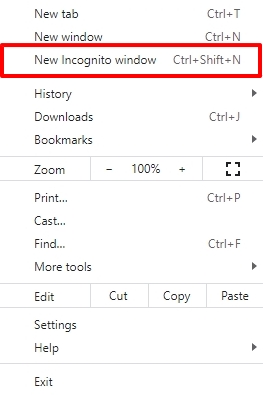
Can you test the form in a Google Chrome Incognito window?
 0
0 -
Ok I actually just tested it in Incognito mode on Chrome and it did work! Finally!
So then I tried it in Firefox's regular browser and private browser and neither worked.
Brave's browser just worked for the form also though, which is great.
So that being said, what could be wrong when not in Incognito mode in Chrome or Firefox as a whole?
0 -
Hi Lamont,
I did another test using the Firefox browser. I received the confirmation message on Firefox as well. The form may not have a problem with Firefox browser in general.
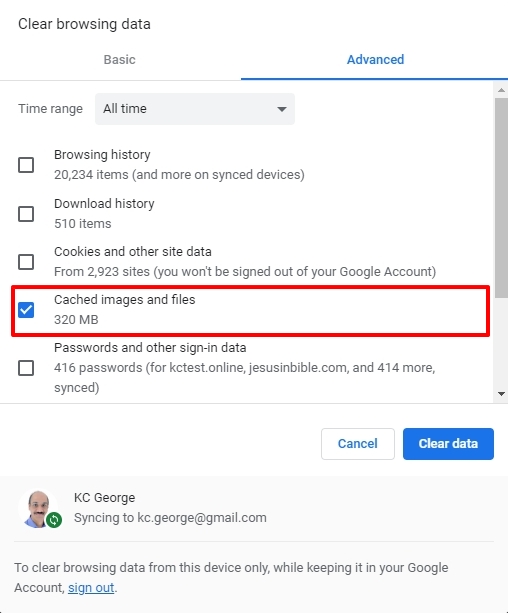
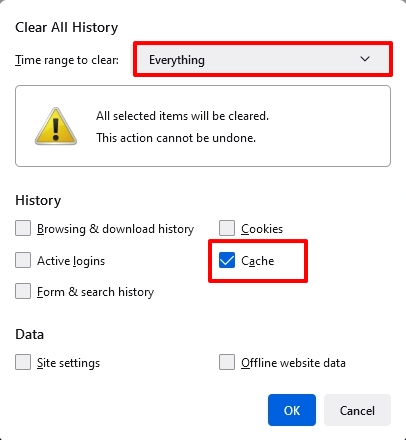
In Chrome and Firefox, you could try clearing cached images and files and see if that makes a difference.
 0
0 -
Hi there KC. Ok so I just tried the above steps, first in Chrome and then FF. I received the EXACT same results as earlier this morning. Tried the Brave browser and that works as well.
0 -
But it's not working otherwise for me. What shall we try next? My fear is obviously having a potential contact go to sign up for my list and it not work, which isn't a good front-facing problem to have as I'm sure you agree. Standing by...
0 -
Hi Lamont,
The issue could be local to your computer /network / ISP. Please test on few mobile devices and someone else's laptop or desktop to confirm if your users would face the same issue.
0 -
Ok so I switched computers and used a VPN and specifically used Firefox (along with testing servers in different states) and all of them worked without a hitch. Not only that, but I tested it on my phone's Safari browser and Firefox Focus (turned Wifi off) and all of these steps worked with hiccup.
That being said, I don't wanna give myself a false sense of security but is it safe to say we're all good here?
Lastly, any idea why my PC is blocking the form? Maybe an Anti-Virus program or Malwarebytes setting or safe url list I need to add Brizy to?
0 -
Hi Lamont,
You don't have a reason to be concerned if the form functioned properly on every external computer and mobile device you have tested.
Some troubleshooting is necessary to determine why your PC is blocking the form. Given that we are located remotely, we are limited in the assistance we can provide. I hope you can get some local help to fix this.
0
Please sign in to leave a comment.
Comments
12 comments