Brizy & Shortpixel AI

I have a short question.
I am using Brizy and Shortpixel AI
Now i have sometimes issues with images that are not displayed when Shortpixel is enabled:
After disabling Shortpixel AI and reenabling it the images are shown without issues.
I contacted Shortpixel Support and here is there answer.
"If I inspect the code I see that Brizy is serving an image for Retina devices, as well as doing a strange resize (see the image URL: Windhundmischling-rennt-im-<picture> tag to serve all the images. All of this is unnecessary with ShortPixel Adaptive Images, and I have a feeling it's related to the issue you are experiencing."
Could you please ask the Brizy team if all of that can be disabled and upload images the usual way?
Is there a way to do this?
-

Hi Denise,
When you add an image to WordPress using Brizy, 6 sizes of the image are created: 2 for desktop, 2 for tablet and 2 for mobile. One for each normal and retina displays. When a user accesses that page, the image that is most suited to his device is loaded, thus optimising the experience and load speed on the page. The resized images are always smaller and of lower resolution compared to the original image.
However you have a choice not to resize images and retain its original resolution and size if you want to. In the image element, you can make this choice.
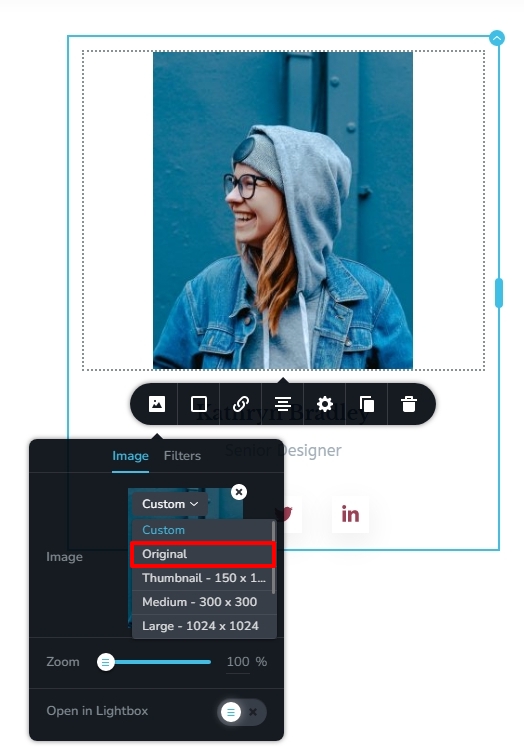
You have multiple image size options to choose from. These options can be categorized into two basic options
- Resize for performance: If you want your images to be resized for performance for different devices, choose the “Custom” option. This option is selected by default for all images.
- Do not resize for performance: If you would like to retain the original resolution and size of your images on your website, choose “Original”. Instead of the original image size, you can also choose other available image sizes WordPress permits. When you choose either original or any other size, your image will not be resized for different devices.
If you select the Custom size option for your images, Brizy handles the image resizing and optimization. If you select the Original or any other option, you can use an image optimization tool like Shortpixel to optimize your images. Images with the Original and other sizes will be optimized by the Image Optimization plugin. Images with Custom size will not be optimized by the plugin.
If you do not want Brizy to optimize your images, please select the Original or another size other than Custom for your images.
0
Please sign in to leave a comment.
Comments
1 comment