Export Site not working

Hey Team,
When I export any site, it only seems to export the html and CSS, nothing else, so the page does not display.
Please help.
I am using brizy cloud on a lifetime license.
-

Hi Scott,
I tested the HTML Download feature of Brizy Cloud right now. It seems to work fine at my end
- Original site: https://rishikeshwalks.in/
- HTML Import: https://html-import.brizytest.online/
In the HTML Import ZIP file, you normally find an 'assets' folder. This folder has an 'img' sub folder which has all the images. Please check if the assets folder was fully transferred to your hosting server.
0 -
Hi KC,
The images are not being exported when I create the zip.
There is no img folder.
This happened in the past, its not exporting the full site.
0 -

Hi Scott,
I downloaded a random project from your account (19 projects) and the images in the img folder are displayed. Please see here. The index.html link is also working correctly. Please tell me exactly on which page you have this issue. Also, please send us additional details, a video screen or screenshots of the issue you have encountered.
Best regards, Nelea.
0 -
Thank you for your assistance, Here is the video I created for you so you can see the issue.
0 -
Hi Scott,
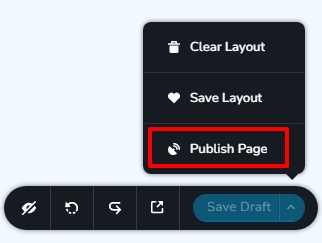
When you publish a website, its HTML gets generated. When a Brizy Cloud website is in Draft, its HTML is not generated. Please click on the 'Publish Page' here and try to import the HTML again.
 0
0 -
Hi KC, this works, thank you!
0
Please sign in to leave a comment.
Comments
6 comments