My website page speed is way to slow

I click on a link on my website navigation to open a different page of my website and I have to say that I must wait up to 10 seconds before the page is loaded.
This is my link:
Is there anything I can do about it? All my potential customers won't wait that long!


-

Hi
We apologize for the inconvenience. The pages load more slowly when a website adds additional languages. We're still trying to figure out how to solve this issue.
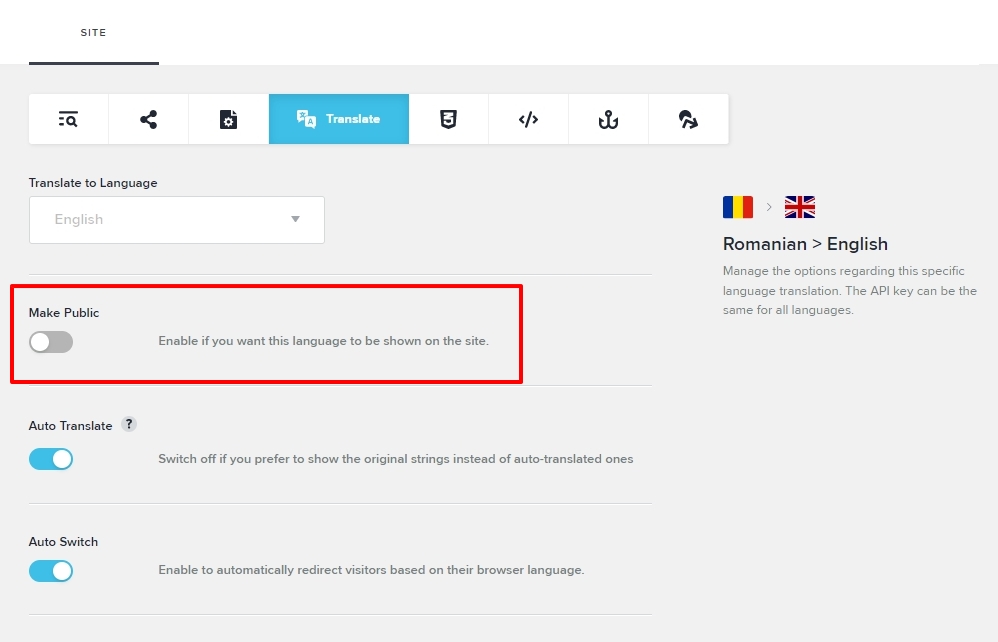
Please consider turning off the English and Russian translations until we can come up with a fix. Your pages will load faster as a result. The translations can be turned off by selecting "Manage" for each language under CMS- Project Settings- Translate and then clicking on the "Make Public" toggle switch to turn it off.
Once we have a solution for the speed issue, you can enable the translations again.
 0
0 -
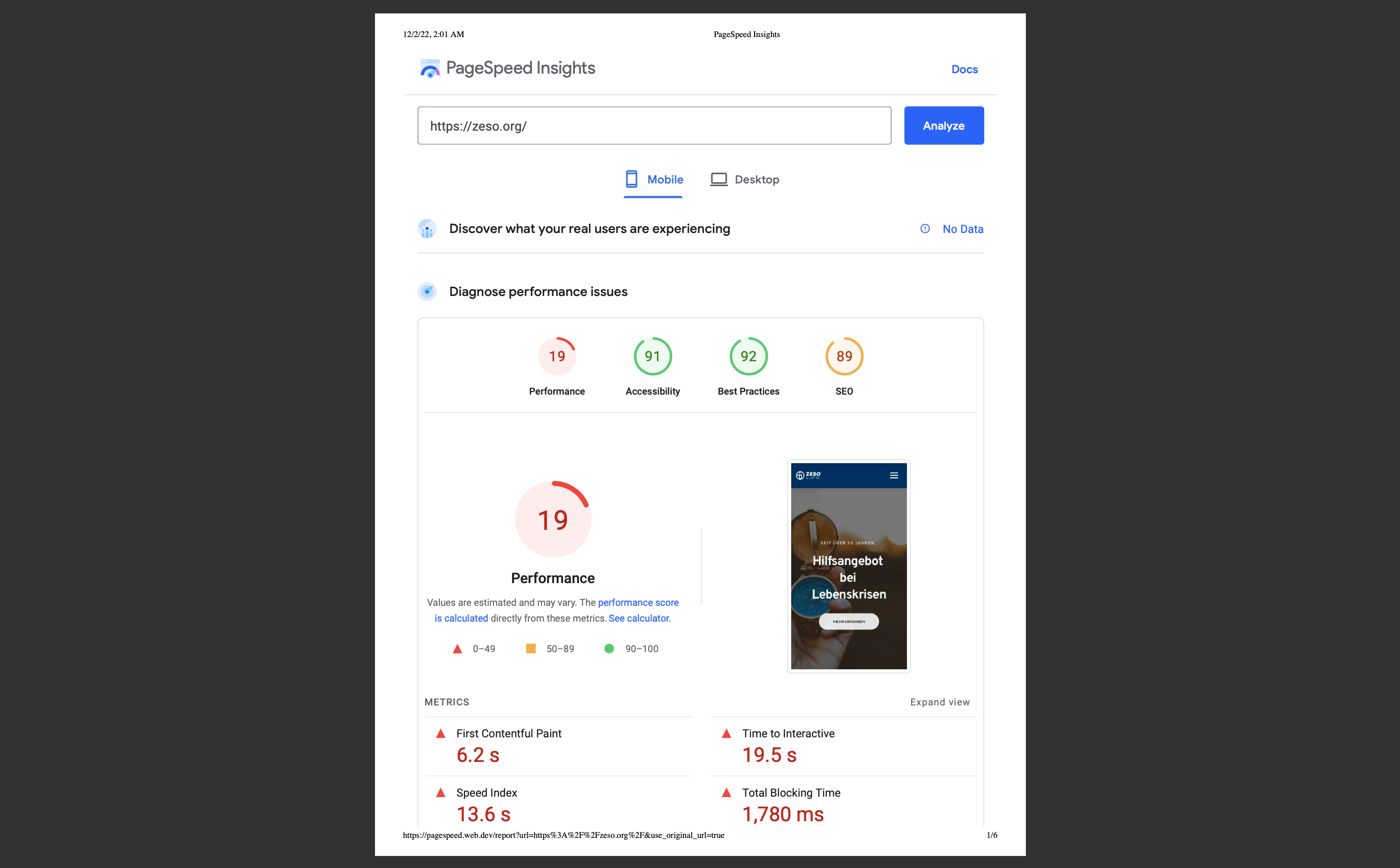
Hi, I would like to pick up our conversation where we left off. I continued to develop the website. I disabled the language. But it looks like that the speed didn't get any better sometimes even worse! It could be the YouTube Video, but it's really silly if Brizy as CMS wouldn't be able to embed a YouTube video without terrible loading times. And other pages without a YouTube video are very very slow as well.
Please let me know if there is a way to fix it?
 0
0 -
Hi
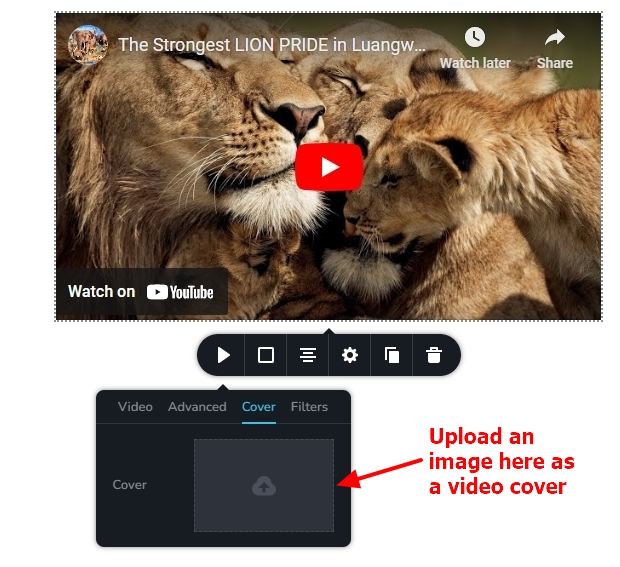
Please add a cover image for your video to improve page performance.
 0
0 -
Thanks for the advise but this solution doesn't work for me because the website needs to be GDPR compliant. I embed the YouTube video with the "privacy-enhanced mode".
https://support.google.com/youtube/answer/171780?hl=en#zippy=%2Cturn-on-privacy-enhanced-mode
That means I need to do it in Brizy via the "Embed" function and there is no option to add a cover image.
0 -
Hi
There are 57 HTTP requests made in total on your website's homepage. By incorporating a cover to the Brizy video element, you can get rid of at least 20 requests. The performance of your page will be negatively impacted by employing embed code to add a YouTube video.
The operation of the YouTube embed code on a page is controlled by YouTube, not by Brizy. You can either use the Brizy Video element and add a cover to it to have a higher page performance, or directly add the YouTube embed code to the page to have a lower page speed. I am sorry; we do not have an intermediate option.
0 -
Ok thanks. But is there a way to have a YouTube video on your Brizy side and also fulfill the GDPR standards?
Could I use https://cookiebot.com Premium Small or any other solution to have a YouTube video on my website without having to wait 19 seconds until the page loads and also have a GDPR compliant website?
0 -
Hi
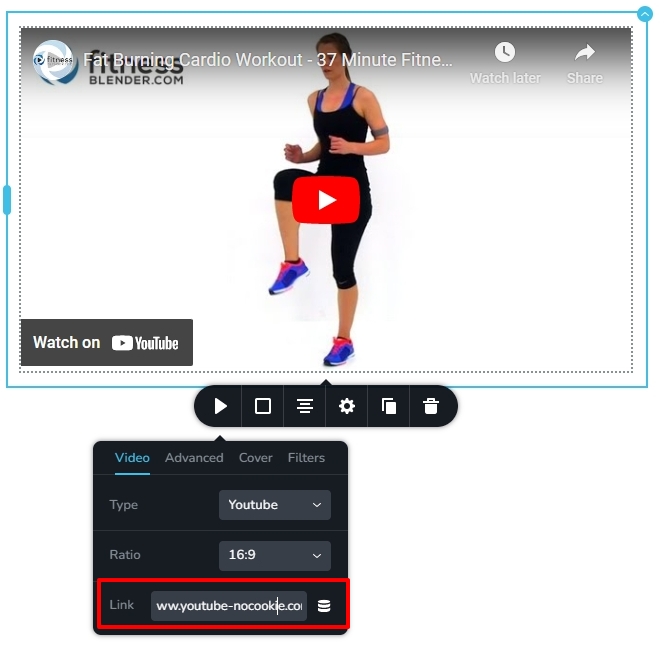
I pasted the URL https://www.youtube-nocookie.com/watch?v=fcN37TxBE_s to the Brizy Video element. The video plays well with this URL. Please try this approach to make the video GDPR compliant and then add a cover to make the page load faster.
 0
0 -
Hi George,
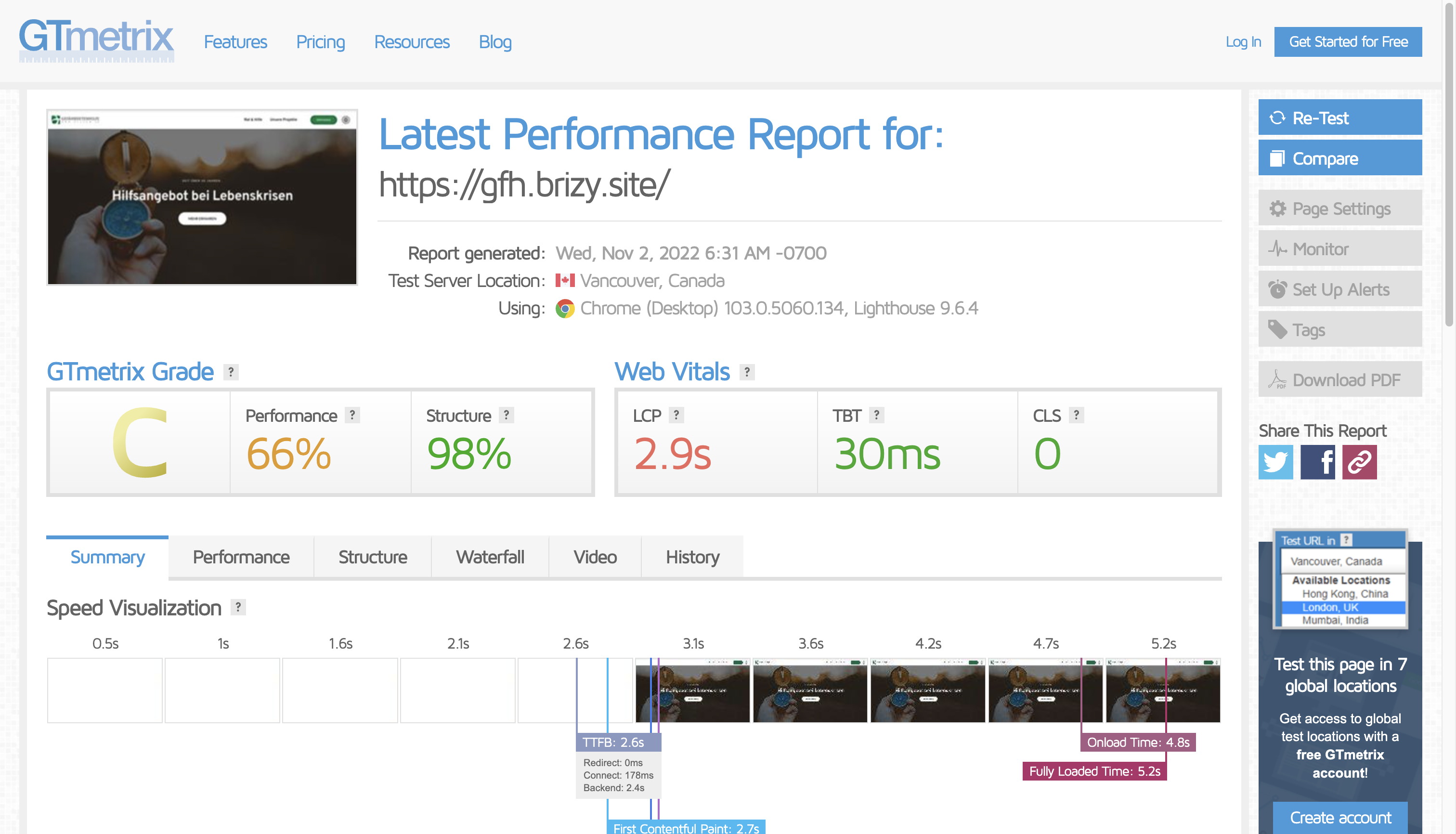
your succession sadly didn't work. I created a video element with a cover image and the YouTube link is youtube-nocookie.com. But the page speed is still way too slow. My GTmetrix Grade is a "C" and my PageSpeed Insights on Google are on mobile: 21.
Is there anything else I can do to speed up the website? Maybe remove the Custom Assets (Advanced Custom Fields) in the footer?
 0
0 -
Hi
Ideally when you have a video with a cover on a Brizy Cloud page, it adds two HTTP requests to youtube.com. For example, please have a look at my test page https://digital-works.brizy.site/video and its GT Metrix report. https://gtmetrix.com/reports/digital-works.brizy.site/rkqXm9fS/ I have added the URL https://www.youtube-nocookie.com/watch?v=fcN37TxBE_s in this test page. In the website waterfall, you will see just 2 HTTP requests to youtube.com.

There is something unusual about your website. I see 12 requests going to youtube.com and youtube-nocookie.com. The Youtube video did not play at my end. When testing the page https://www.zeso.org/ with Pagespeed Insights, I get an error.
I would like to take a look at your project to see what it causing these issues. Please add me as a Team Member to your project. My email: kc.george@brizy.io. Please assign me 'Manager' role.
 0
0 -
Thank you. I will add you right away.
0 -
Hi
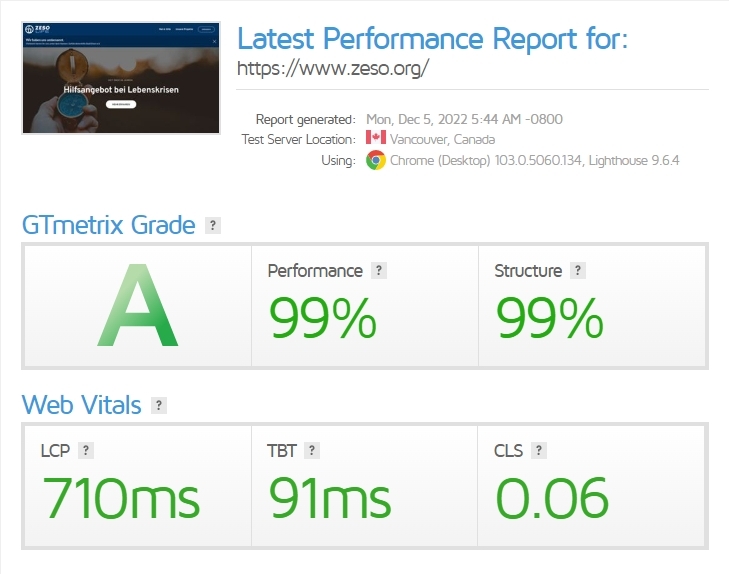
The reason for low performance was an embed video in a popup. I have replaced the embedded video with Brizy Video element and have added a cover. Now the overall performance of the website has increased. Please have a look at the GT Metrix report: https://gtmetrix.com/reports/www.zeso.org/Ecs1QsFG/
Please note that the URL you have added to the Video element on the homepage is incorrect and hence the video does not play. Please paste the correct URL.
0 -
Wow! Thanks a lot! That was very helpful. 👍
The mobile performance is now at 59. Google says the "Time to Interactive" is 6.8 s. Is there anything else I could do about that?
Your Demo ist super fast: https://agens.brizy.site/
What makes the difference?
0 -
Hi
Brizy design layouts often get a mobile Pagespeed Insights score between 60 and 80. It's similar to the 59 your website has received, which is a good score.
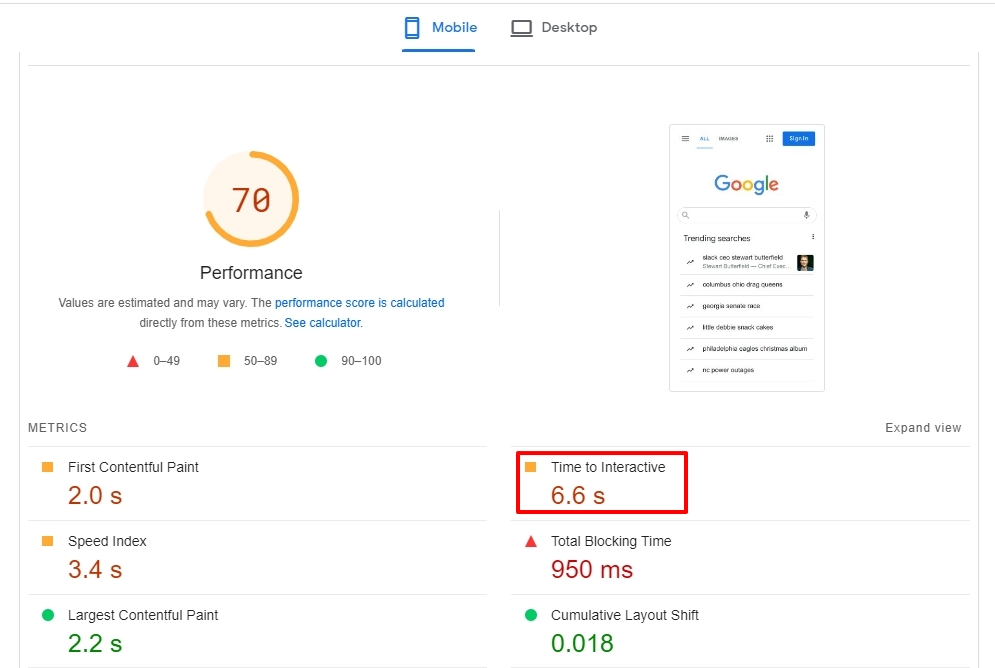
Have a look at the "Time to Interactive" score of https://www.google.com/. Your website's Time to Interactive is only 0.2 seconds longer than Google's. You shouldn't let this disturb you, in my opinion.
 0
0
Please sign in to leave a comment.
Comments
13 comments