free stock images no longer available

I'm using Brizy Pro with the Astra theme and Astra Pro and Astra Premium Starter Templates plugins.
The Premium Starter Templates plugin makes available free stock images from Pixabay, and this option used to always be visible when selecting media for upload. But now it's no longer visible.
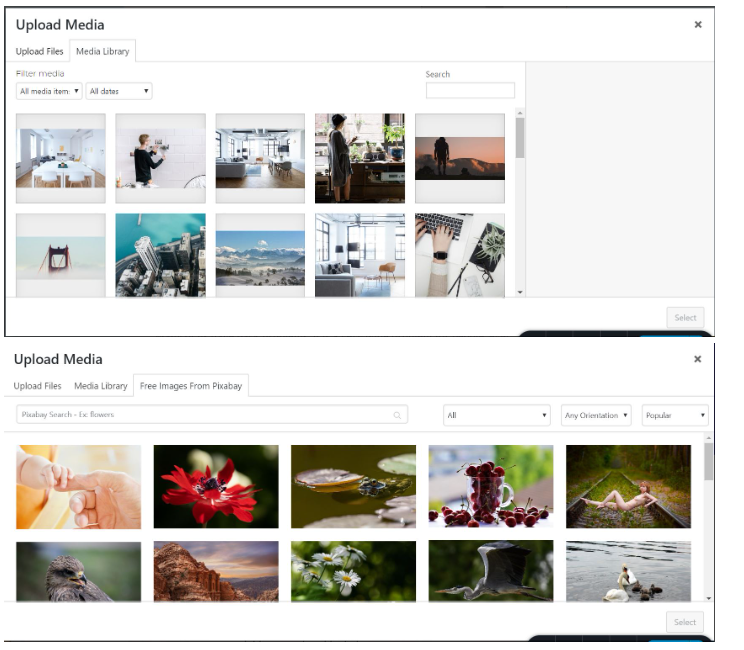
Why is the Free Images tab no longer visible?
Note that if I create a page and add an image with the Block Editor, the Free Images tab IS visible.
The tab was visible with Brizy Pro until fairly recently. All of the stock images on my currently live site were selected using that option.
I'm running Brizy 2.4.11 and Brizy Pro 2.4.10 (activated with license validated).
In the General tab, I have selected "Enable Brizy Page Builder Templates in Starter Templates."
The Astra plugins are also the latest versions with licenses validated.
-

Hi Mel,
You are right; Free Image from Pixabay tab is not available when accessing the Media Library from Brizy.
We apologize for the inconvenience. At the moment, we do not have a plan to work on fixing this issue. We will look into this in the future.
0 -
It's been 7 months and still no resolution for this issue.
This functionality was there before. Why can't it be restored?
Can you provide any status as to whether this is on the radar for resolution?
0 -
Hi Mel,
The Astra Starter Templates plugin makes the free images from Pixabay accessible while using the Media library in the Gutenberg editor. https://wpastra.com/docs/starter-templates-pixabay-images/ This is an Astra Starter Templates feature and how it operates depends on how the Astra team has designed it. Hence Brizy developers do not have full control over this feature. Collaboration between the developers of these two products is necessary to guarantee interoperability of this feature within the Brizy editor. We have not yet reached an agreement with the Astra team to collaborate on this.
0 -
Your original response to this issue, *dated 10/27/2022*, was this:
***
KC GeorgeHi Mel,
You are right; Free Image from Pixabay tab is missing when accessing the Media Library from Brizy. Thanks for reporting this issue. We will work on fixing it.
**
So now you're editing support responses?? really??
Disabling this very useful feature was not done by design.I did enter a support request with the Astra team, Brainstorm Force.
And then I closed the ticket on 11/2/2022 with the Astra team since the issue appears to be purely on the Brizy side.I can't recall coming across a technical support platform where the response was *edited* by the support team after the fact.
The only reason I purchased a lifetime subscription to Brizy Pro was its integration with Astra.
And now you're saying that you haven't yet "reached an agreement" for collaboration with Astra?
0 -
Hi Mel,
At first glance, it appeared to me that it was a bug on Brizy's end. But after discussing with the development team, I realized this is an Astra feature and not a Brizy feature. Then I edited my incorrect reply to make it more accurate. (If we make a mistake, we do edit our response to correct the mistake)
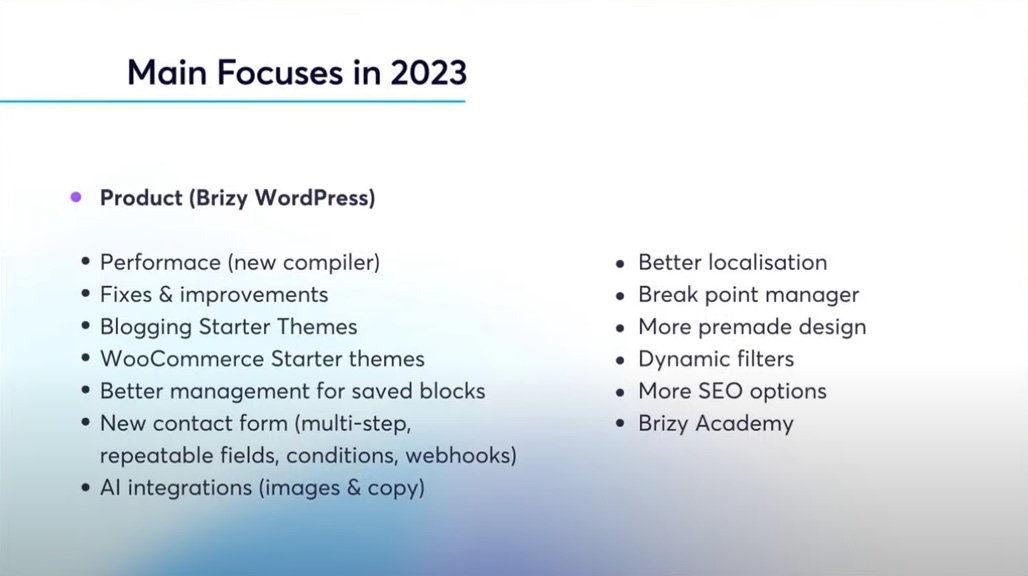
Brainstorm Force is right; this work is not 100% Astra nor 100% Brizy. Both teams need to discuss and arrive at a solution. We apologize that we could not prioritize this activity till now. These are the focus areas for this year. These activities are taking priority over fixing the Pixabay issue with Astra theme.
 0
0 -
Your response is not acceptable. The "edited" version of your response completely obscures the original discussion, making it impossible to follow and giving the entirely wrong impression of what was discussed.
And I don't know what you mean by "Brainstorm Force is right". They agree with me that this is entirely an issue on Brizy's part. It was working perfectly before, and now it's not.
And I don't need to see the 2023 focus list. This is a defect, a downgrade in functionality. It's not a feature request.
0 -

Hi Mel,
Sorry for the inconvenience. I'm aware that this feature was functional previously, but for some reason, in the last few updates, access to the stock photos disappeared. The issue has now been passed on to our development team for further investigation. I don't have an estimated time of resolution; however, we recognize the importance of getting this resolved in one of the future upcoming versions.Best regards,Ariel H.0 -
Thank you very much.
0
Please sign in to leave a comment.
Comments
8 comments