Problem with SearchIQ

My site at fcgweb.com is encountering a problem with the SearchIQ plugin and Brizy. This has worked for some time but now I get the following error:
Fatal error: Uncaught Error: Call to undefined function WP_Filesystem() in D:\home\fcgweb.com\wwwroot\wp-content\plugins\searchiq\library\core.php:604
Stack trace:
#0 D:\home\fcgweb.com\wwwroot\wp-content\plugins\searchiq\library\core.php(867):siq_core->log_error()
#1 D:\home\fcgweb.com\wwwroot\wp-content\plugins\searchiq\library\core.php(805): siq_core->_siq_insert_update_post()
#2 D:\home\fcgweb.com\wwwroot\wp-content\plugins\searchiq\library\plugin.php(195): siq_core->siq_update_post()
#3 D:\home\fcgweb.com\wwwroot\wp-includes\class-wp-hook.php(307): siq_plugin->siq_update_metadata()
#4 D:\home\fcgweb.com\wwwroot\wp-includes\class-wp-hook.php(331): WP_Hook->apply_filters()
#5 D:\home\fcgweb.com\wwwroot\wp-includes\plugin.php(476): WP_Hook->do_action()
#6 D:\home\fcgweb.com\wwwroot\wp-includes\meta.php(334): do_action()
#7 D:\home\fcgweb.com\wwwroot\wp-content\plugins\brizy\editor\post.php(553): update_metadata()
#8 D:\home\fcgweb.com\wwwroot\wp-content\plugins\brizy\editor\post.php(331): Brizy_Editor_Post->set_needs_c in D:\home\fcgweb.com\wwwroot\wp-content\plugins\searchiq\library\core.php on line 604
There has been a critical error on this website.
-----
I have checked the SearchIQ core.php file and just before the call to WP_filesystem() at line 604 there is a check to be sure that file is available:
if( !file_exists( $this->errorFile )) {
$this->require_wp_filesystem();
}
Thus the problem appears to be with the Brizy error file. The SearchIQ plugin has not changed, but Brizy has.
How can I fix this error?
-

Hi Forrest,
The plugin SearchIQ appears incompatible with the latest Brizy releases. When attempting to activate the plugin, I get this error in the WordPress Dashboard and I could not activate it.

Instead of SearchIQ, consider using some of the more widely used search plugins.
You could also explore other plugins from this list https://blog.hubspot.com/website/wordpress-plugins-to-improve-search-functionality
0 -
Thanks for this information. I installed and set up Relevanssi according to the instructions. However, I am not able to set up a link to perform a search. The instructions on how to do this are not clear. For example, I have a Search page on my site that was created using Brizy. It currently has a shortcode that uses SearchIQ. How do I change that to use Relevanssi? I also have a Search option in my Main menu - how to I set that to use Relevanssi? It just links to the Brizy Search page.
0 -
Hi Forrest,
Please use the Brizy Search element in place of the SearchIQ shortcode. Relevanssi replaces the default WordPress search option whereas SearchIQ provided an additional search function.
To use the default search function within WordPress, you typically setup a Brizy Search Template. Please follow the same procedure to make the Relevanssi search work with with Brizy. To setup a Search Brizy Template, please use this Display Condition
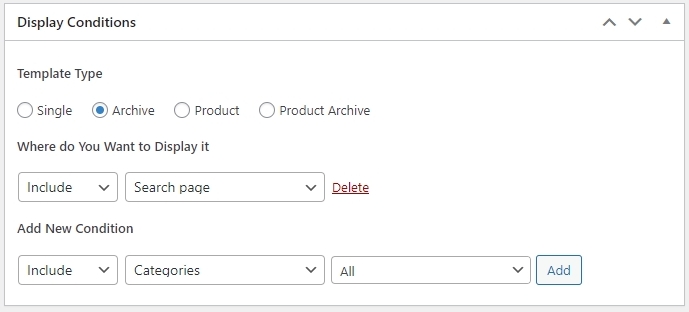
Then click on 'Edit with Brizy' and use the Brizy Archive element to display the search results. You can also add the Brizy search element to the Search Template.
When you are testing the Search Template, please keep the Relevanssi plugin deactivated. Once you have successfully setup the search template for the default WordPress search, enable and configure the plugin to customize the search function.
We have not tested Relevanssi with Brizy yet. In case if it does not work with Brizy, please try other alternate options.
0
Please sign in to leave a comment.
Comments
3 comments