Typography issues

I am having trouble with Typography Colors using Brizy and it is very frustrating that I have to use Custom CSS to modify the colors all the time. Can you please help? I have used CSS to get the Text within a UL or OL to be a certain color, but now the text that are Links within the bullet or number lists are not showing up as the light blue. How do I make it so that ALL links on the site are displayed as the light blue color #0084b6, regardless of what the Body text color is. Also, since I had to use CSS to get the Bullets to show up as blue, now the Dots in my slider on the homepage are blue, even though the settings in the element are set to White.
Examples can be seen here:
- Dots in slider color not white: https://visionzeronetwork.org/
- Dots of bullet list "Narrowing Intersections" are darker than the Text. Want the Dots to match text color: https://visionzeronetwork.org/use-these-tools-to-save-lives/
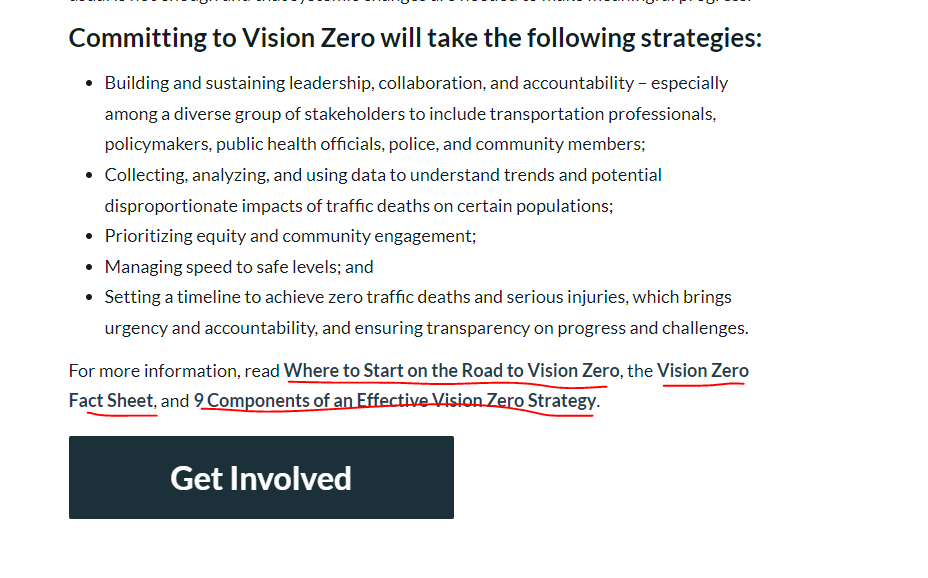
- Links at bottom of this page are not showing up as Lighter Blue color "Where to Start on the Road to Vision Zero, the Vision Zero Fact Sheet, and 9 Components of an Effective Vision Zero Strategy.": https://visionzeronetwork.org/about/what-is-vision-zero/
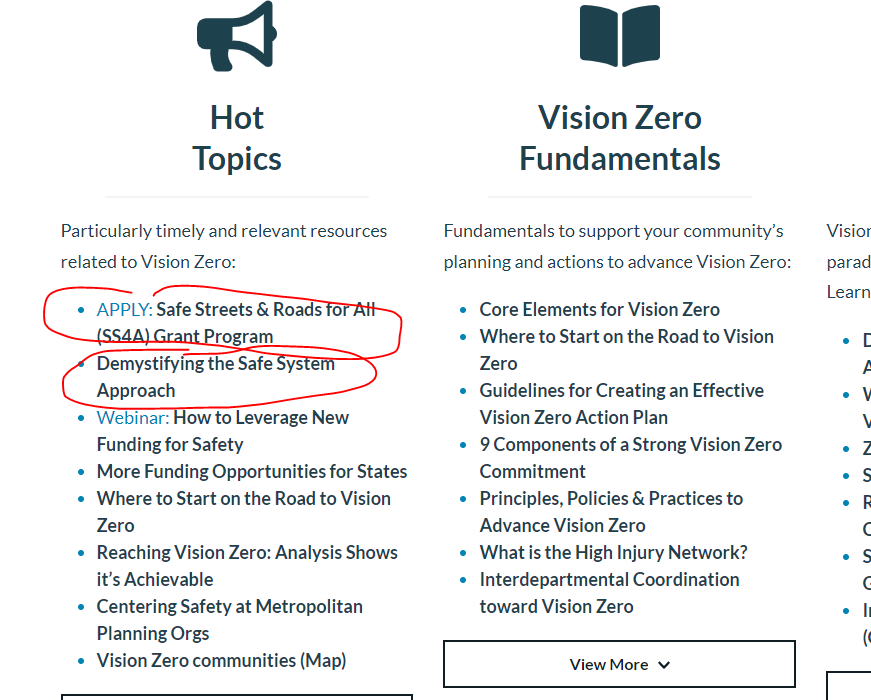
- Links in Bulleted lists on this page do not display as Lighter Blue: https://visionzeronetwork.org/resources/
Basically, we want the Body text, Bullet Text, List text, etc. to be the color: #1e414e
But when any of these bits of text have a Hyperlinke/URL, we want to color to appear lighter, as color: #0084b6
I seem to fix it with CSS but then it leads to other issues on either the Pages or Posts. It would be great if Brizy had a Global way to set some of these typography color settings. I appreciate your help with the Custom CSS or other solution to resolve these issues.
-

Hi Eric
Please try adding this to your Additional CSS and see if it works for all links
/*Add link color to regular texts */
p a {
color: #0084b6!important;
}

/*Add link color to bullet lists */
.brz .brz-rich-text__custom a {
    color: #0084b6!important;
}
When you say links at the bottom of the page, are you referring to the link colors of the menu texts in the footer? Please set the menu link colors in the menu element.
The bullets points do not seem to take on the colors of the text but darker than the text. We have reported this issue. We are working on fixing it.
0 -
Hi, the links at the Bottom of the page content I am referring to I pasted into the previous message. I am not referring to the footer.
This is the page: https://visionzeronetwork.org/about/what-is-vision-zero/
In the last paragraph, you see this text and Links that are not displayed as the lighter blue color:
"Where to Start on the Road to Vision Zero, the Vision Zero Fact Sheet, and 9 Components of an Effective Vision Zero Strategy."
---
0 -
Hi Eric,
Please try this CSS and see if it helps.
/*Add link color to regular texts */
p a {
color: #0084b6!important;
}

/*Add link color to bullet lists */
.brz .brz-rich-text__custom a {
    color: #0084b6!important;
}

/*Add link color to bold texts*/
.brz .brz-rich-text strong a {
    color: #0084b6!important;
}
0 -
That doesn't seem to work. I have a lot of Additional CSS in the Customize panel and some of it may be conflicting. I have been given this CSS by you in the past. Also you did not address ALL my questions in my last email. Please review all the issues below with screenshots and let me know what you advise. I appreciate your help.
- The Links in the Last Paragraph in bold on this page are still not appearing as light blue: https://visionzeronetwork.org/about/what-is-vision-zero/
- The bullet bold links on this page do not display as Light Blue: https://visionzeronetwork.org/resources/
- Also, you did not address the Dots color issue in the Homepage slider from my initial message. They are displaying as Dark Blue but I want them to stay White as per the settings in the Slider element: https://visionzeronetwork.org/
- Please see ALL the custom CSS related to text color being applied and let me know what to remove and what to keep. I have pasted it into a Code Block below.

/* text color */
.single p {
  color:#1e414e !important;
}

/* unvisited bullet link */
.li a:link {
  color: #0084b6 !important;
}

/*Add link color to regular texts */
p a {
color: #0084b6 !important;
}

/*Add link color to bullet lists */
.brz .brz-rich-text__custom a {
    color: #0084b6 !important;
}

/*Add link color to bold texts*/
.brz .brz-rich-text strong a {
    color: #0084b6 !important;
}

/* text color */
.single p, strong, b, em, i, ul, ol {
  color:#1e414e !important;
}


/* unvisited link */
.brz .brz-rich-text__custom a:link {
  color: #0084b6;
}

/* link color */
.brz .brz-wp-post-content a:link {
  color: #0084b6;
}

/* link color */
.brz-rich-text a {
   color: #0084b6 !important;
}

b, strong a {
    color: #0084b6 !important;
    font-weight: 700!important;
}

b, strong a:hover {
    color: #0084b6 !important;
    font-weight: 700!important;
}

/* fix text jumping issue on hover */
.brz .brz-css-byxuk strong, .brz .brz-css-byxuk:hover b {
    line-height: inherit;
}

.brz .brz-css-aqpie strong, .brz .brz-css-aqpie:hover b {

line-height: initial;

}


/* visited link */
.brz .brz-rich-text__custom a:visited {
  color: #01688f;
}
0 -
Hi Eric,
Can you please copy paste all your previous code into a text editor like Notepad, save it as a backup and replace the previous code with the code below and check if ALL the issues you have mentioned above are addressed.
/*Add link color to regular texts */
p a {
color: #0084b6 !important;
}

/*Add link color to bullet lists */
.brz .brz-rich-text__custom a {
    color: #0084b6 !important;
}

/*Add link color to bold texts*/
.brz .brz-rich-text strong a {
    color: #0084b6 !important;
}


/* fix text jumping issue on hover */
.brz .brz-css-byxuk strong, .brz .brz-css-byxuk:hover b {
    line-height: inherit;
}

.brz .brz-css-aqpie strong, .brz .brz-css-aqpie:hover b {
line-height: initial;
}
0 -
Ok, some of this worked, but it has also cause an issue on the Homepage where I have specified via CSS on the Specific Element to make the Text dark blue for Links. They are now being overwritten and showing up as the Light Blue. See here:
I have this Custom CSS applied in the Advanced Styling section of the Text element in the Brizy builder, but it is not working anymore.
element p a {
color: #101d23 !important;
}element p a {
color: #101d23 !important;
}
element p a {
color: #101d23 !important;
}/* unvisited link */
h4 a:link {
color: #101d23 !important;
text-decoration: none;
}/* visited link */
h4 a:visited {
color: #101d23 !important;
text-decoration: none;
}/* mouse over link */
h4 a:hover {
color: #101d23 !important;
text-decoration: underline;
}
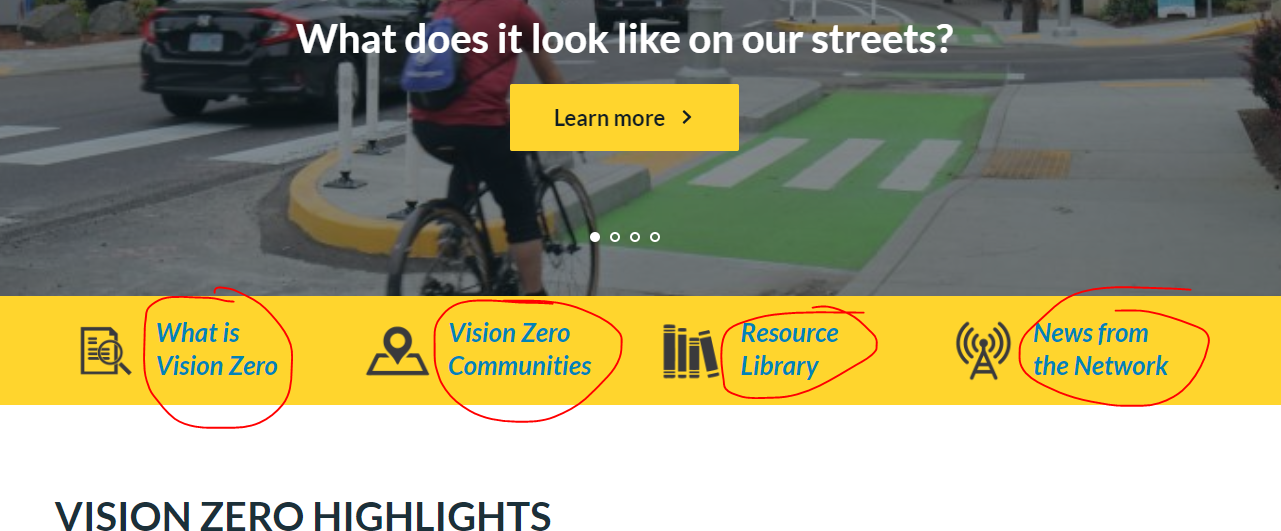 0
0 -
Also, on the News page, which is a Brizy Archive Page Template I created, the Categories Meta Link are showing up as the Blue but I have CSS in the Advanced Panel to have this color for the Links in the Meta #49CA9F. I have this CSS in the Advanced Styling area in Brizy but it's not working:
element p a {
color: #49CA9F !important;
}
.brz .brz-rich-text__custom a {
color: #49CA9F !important;
}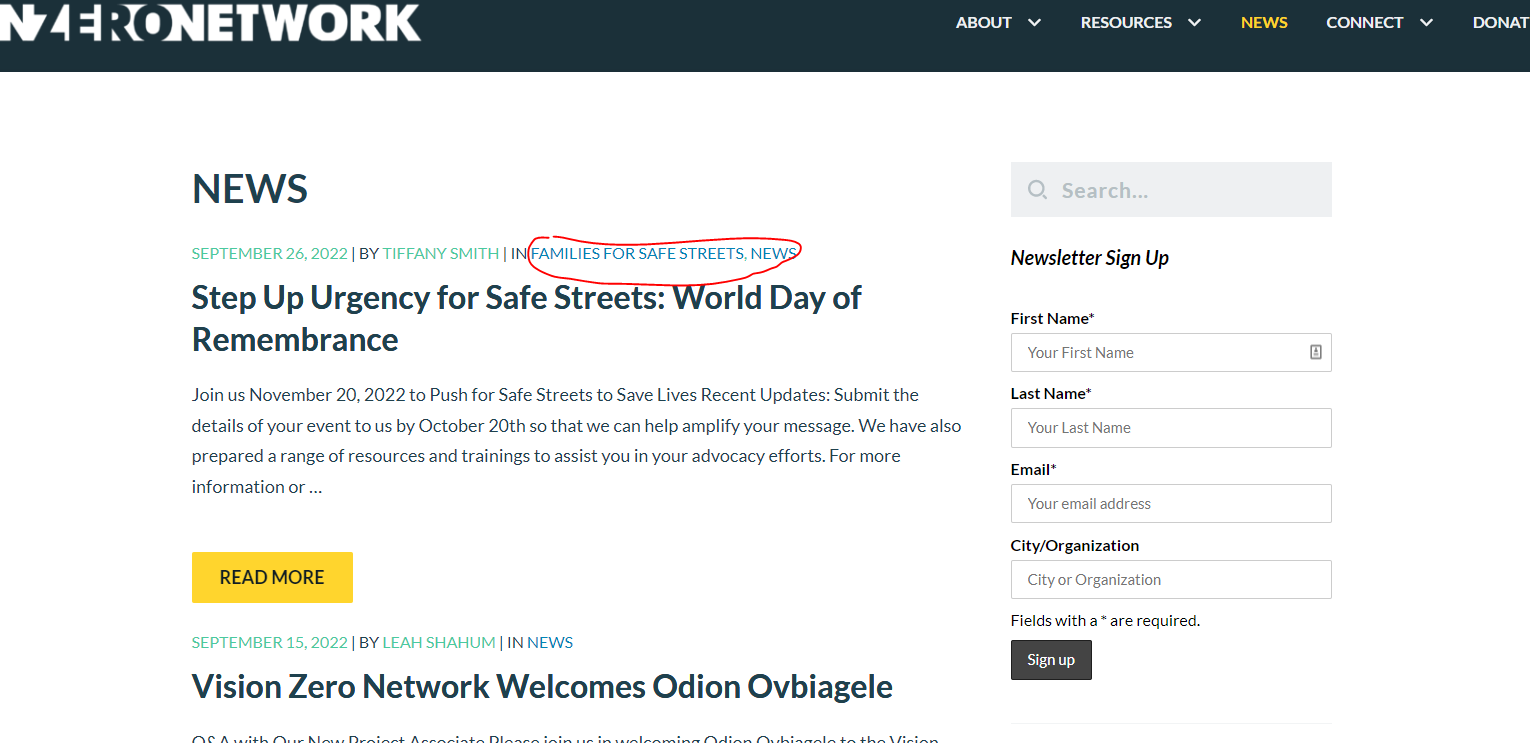 0
0 -
Hi Eric,
To override the color of a specific text element, please replace the previous code with the code below in the Custom CSS under the Advanced tab and set the color in the code
/*Add link color to regular texts */
p a {
color: #0084b6 !important;
}

/*Add link color to bullet lists */
.brz .brz-rich-text__custom a {
    color: #0084b6 !important;
}

/*Add link color to bold texts*/
.brz .brz-rich-text strong a {
    color: #0084b6 !important;
}
0 -
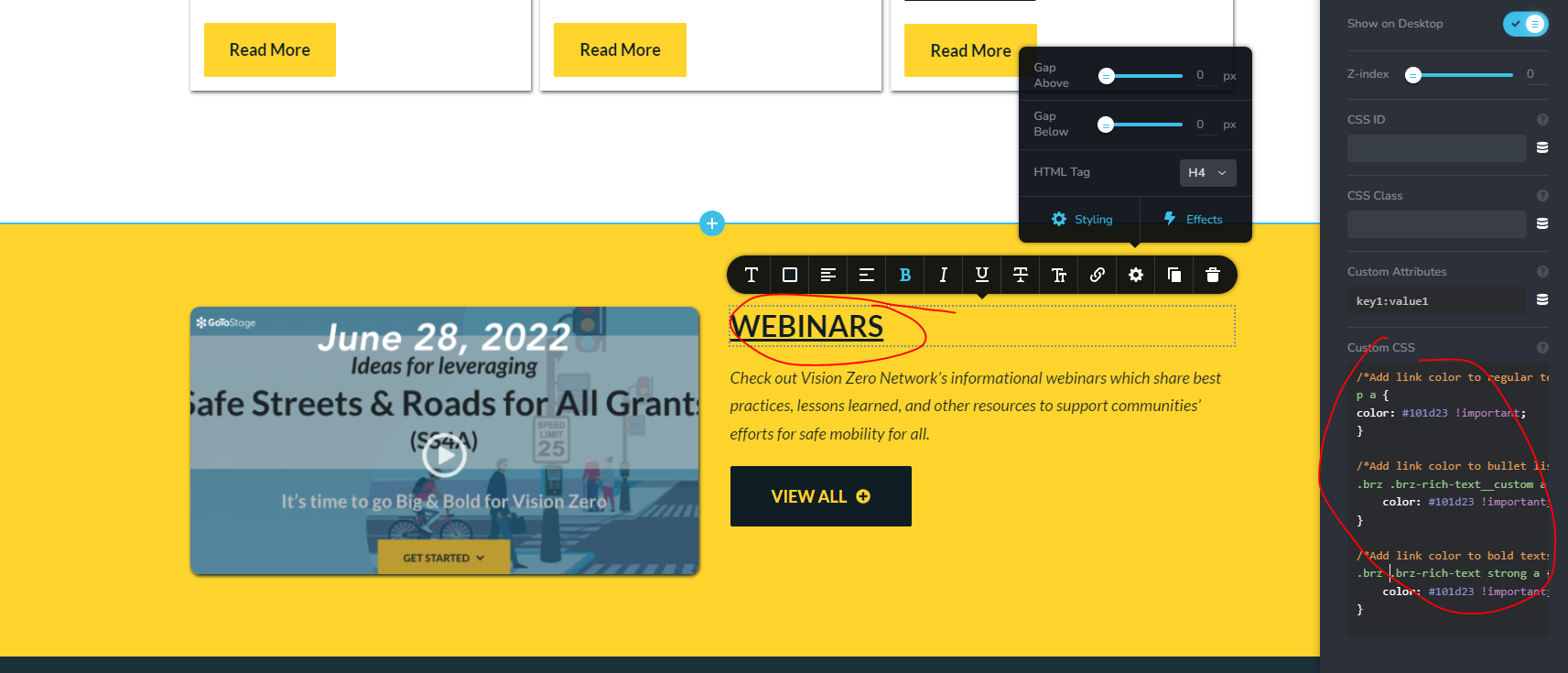
That did not work. I added this code to the elements for the Homepage which I have included as a screenshot and they are still displaying as Light Blue and I want them to appear as Dark Blue #101d23. As you can see, in the Backend Brizy Editor, the text appears Dark Blue, but on the Frontend when you are viewing the color still appears light blue for these text links.
https://visionzeronetwork.org/
/*Add link color to regular texts */
p a {
color: #101d23 !important;
}/*Add link color to bullet lists */
.brz .brz-rich-text__custom a {
color: #101d23 !important;
}/*Add link color to bold texts*/
.brz .brz-rich-text strong a {
color: #101d23 !important;
}element p a {
color: #101d23 !important;
}/* unvisited link */
h5 a:link {
color: #101d23 !important;
text-decoration: none;
}/* visited link */
h5 a:visited {
color: #101d23 !important;
text-decoration: none;
}/* mouse over link */
h5 a:hover {
color: #101d23 !important;
text-decoration: underline;
}
 0
0 -
Hi Eric,
Please remove "!important" from the Additional CSS code and see if that helps. You can replace code in the Additional CSS with this code.
/*Add link color to regular texts */
p a {
color: #0084b6;
}
/*Add link color to bullet lists */
.brz .brz-rich-text__custom a {
color: #0084b6;
}
/*Add link color to bold texts*/
.brz .brz-rich-text strong a {
color: #0084b6;
}
/* fix text jumping issue on hover */
.brz .brz-css-byxuk strong, .brz .brz-css-byxuk:hover b {
line-height: inherit;
}
.brz .brz-css-aqpie strong, .brz .brz-css-aqpie:hover b {
line-height: initial;
}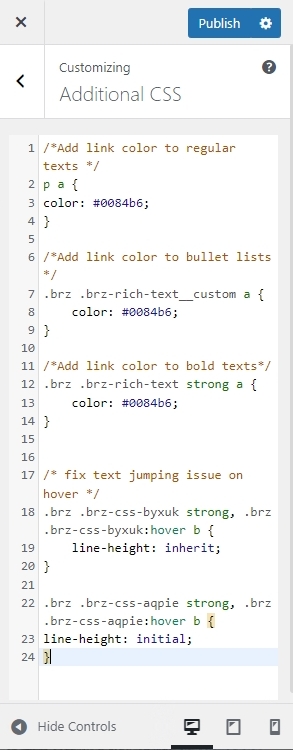 0
0 -
Thank you. That has worked now. I have only one more question. In the Footer I have a couple of Links but because I have input CSS to make some of the links on this page dark blue, they also appear dark blue. Unfortunately you cannot read them because the Footer is also a Dark blue background. What CSS can I use to only impact the Links in the Footer to make them appear white. See screenshots below. I tried applying a Custom CSS Class "footer_link" and then Custom CSS to these two text elements, but it does not seem to be working.
/*Add link color to regular texts */
.brz .brz-rich-text__custom footer_link a {
color: #FFFFFF !important;
}footer_link {
color: #FFFFFF !important;
} 0
0 -
Hi Eric,
Please try these two steps to make the links in the footer light blue like the rest of the site. Making it while may not be possible.
- Replace the earlier Custom CSS of the Brizy element under the Settings - Advanced tab with this. The earlier one had more code.
/*Add link color to regular texts */
p a {
color: #0084b6 !important;
}- Change the typography of the footer text to something other than paragraph. For example, you can change it to Above Title, Sub title, Heading 6 etc and then set the appropriate font size in the Global Typography.
0 -
I don't understand. Isn't that the function of the Custom CSS Class, to be able to assign a custom class and css to a specific element in Brizy and not to the entire page/site? Why is there not the ability to use the Advanced Custom CSS area to make this text link appear white? Is this is flaw in the Brizy builder? Can you please escalate this to someone else on the team who can help?
0 -
Hi Eric,
You're right; I couldn't target specific elements on your page. Perhaps it's because I'm not familiar with CSS.
My colleague has agrees to look into it. I am making a private ticket for you. You will receive a email from support@brizy.io. If you would like to get help for the CSS, please share with him the WordPress credentials by email.
0 -
For some reason now the Heading font style is changing size when I hover over the content area of a Post. You can see the issue here, and I have uploaded a video of the issue here:
Heading text changes size on Hover over Post content area
https://visionzeronetwork.org/calling-on-the-mayors-of-america/
https://drive.google.com/file/d/1RtKm0fW9SaC4hMcDPAaNoWpmBEckMbY_/view?usp=share_link
0 -

Hi Eric,
We're still looking into this, I will reply to you in your other post.
Best regards,
Ariel H.
0 -

why in the world should we have to use css for something as basic as styling headers? the Styling section is for styling, not typography OR colors. it's both. and yet if i want to set my heading colors, i have to somehow figure out the css and type that in? that's the antithesis of what brizy is for!
brizy makes it so damn hard to style your own projects. it's like all we are meant to do is either pick premade blocks and live with them, or turn our site over to ai. neither is acceptable.
0 -
Hi T.A.,
Thank you for sharing your feedback.
Could you please describe the specific issue you’re encountering or what you’re trying to achieve with the header styling? It’s possible that this may be related to a specific setup or a different issue on your website, so a bit more detail will help us check this more accurately.
Looking forward to your update.
Kind regards,
Ariel H.0
Please sign in to leave a comment.
Comments
18 comments